Break a short video into shots before generating it
Quick answer
Divide an idea into an opening, an action and an ending. Define each shot’s subject, movement and continuity conditions separately.
tokensmore Editorial ·
Define the viewing goal in one sentence
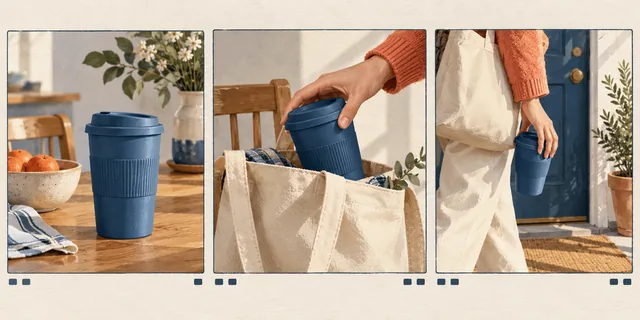
For a portable coffee-cup introduction, the intended takeaway might be “easy to carry on a commute.” Do not squeeze the brand story, material close-ups, unboxing and travel scenery into the first shot.
List the essential images: putting the cup into a bag, carrying it out the door, and a close-up of the closed lid. Give each shot one information point so that you can judge whether it did its job.
Write a minimal brief for each shot
Include the subject, setting, action and camera movement. Give one shot one main action, such as a hand placing the cup into a canvas bag while the camera slowly moves closer. Avoid demanding a rotation, a fast pull-back and a location change together.
List continuity constraints separately: cup color, sleeve, time of day and lid position. A model may not preserve them perfectly, but they provide criteria for selection and manual repair.
- Write the opening’s main message first.
- Give the middle one observable action.
- Leave a stable ending and room for editing.
Compare individual shots before assembling them
Use the actually available model and parameters in tokensmore.ai’s video tools to test a short shot. If an entry is not connected yet, prepare the storyboard and assets rather than substituting a simulated output for a real test.
Place reference images, descriptions and previews on the canvas. Mark which version passes subject, motion and composition checks, then edit the transitions. A good thumbnail does not justify accepting the entire clip.
Play the whole clip to evaluate rhythm
Check for deformation during movement, sudden identity changes and enough stable footage at the end for editing. A paused screenshot proves only one frame, not motion quality.
Record usable segments, work that needs another attempt and asset sources. A clear shot list supports creation and saves repeated team discussions about why a particular version was rejected.
Continue your workflow
Check the tool page for current availability, input limits and costs.
- Image-to-video and reference-frame planning
- Preparation and checks
- Short-video shots and generation inputs
- Preparation and checks
- Prompts and input preparation